Controladores STM32
STM32 is a large family of 32-bit microcontrollers from STMicroelectronics based on Arm Cortex-M cores. It is not one board or one chip: under the STM32 name there are dozens of series and hundreds of models.
In the world of 3D printers, STM32 is very common. Many ready-made printer boards, expansion boards, CAN boards, and controllers use STM32. For Klipper and printer peripherals, it is one of the most practical options if you are ready to work with a specific board.
Where STM32 is useful
STM32 is good for:
- main 3D printer board;
- additional MCU in Klipper;
- fan, sensor, and output control board;
- CAN board or toolhead board;
- more serious custom board;
- tasks requiring timers, PWM, ADC, UART, SPI, I2C, CAN, or USB;
- projects needing a ready-made industrial ecosystem and documentation.
If RP2040 is a simple and clear start, STM32 is a wide world of controllers where you can select a chip for almost any task. But flexibility comes at the cost of complexity.
STM32 is a family
You cannot say "I got an STM32" and stop choosing. You need to know the exact model.
Examples of series:
- STM32F0 / STM32C0 / STM32G0 — budget and mass-market series;
- STM32F1 — old but very well-known series, often found in Blue Pill and old boards;
- STM32F4 — more powerful series, popular in controllers;
- STM32G4 — interesting for control, timer, and analog peripheral tasks;
- STM32H7 — powerful high-end controllers;
- STM32L / STM32U — series focused on low power consumption.
For a typical user, what matters is not the marketing of the series, but specific things:
- is there support in the firmware you need;
- how many GPIO are really exposed on the board;
- does it have USB, CAN, UART, I2C, SPI;
- how much flash and RAM;
- how to flash it;
- is there a proper pinout and schematic.
The board matters more than the chip name
The same STM32 can be on very different boards.
Common variants:
- Blue Pill / Black Pill — cheap small boards, often with STM32F103 or STM32F4 class, but clone quality varies;
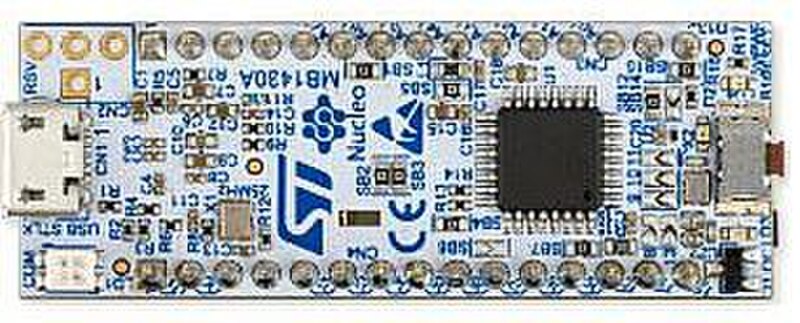
- STM32 Nucleo — official ST development boards with built-in ST-LINK;
- ready-made 3D printer board — already has drivers, connectors, MOSFET outputs, thermistor inputs, fuses, and power connectors;
- toolhead/CAN board — specialized board for a printer head or remote module;
- custom board — requires complete power, USB, SWD, protection, and routing design.
For a first practical project, it is usually easier to get a ready-made board with documentation than a bare STM32 or a random clone without a schematic.
STM32 and Klipper
STM32 is one of the main paths for a Klipper MCU.
Typical architecture:
Source: Wikimedia Commons, Avandalen, CC BY-SA 4.0

The Klipper host runs on a Linux device, and the STM32 board physically controls pins: switches MOSFET outputs, reads thermistors, controls fans, receives limit switch signals, and communicates with the host via USB, UART, or CAN.
For iDryer-like peripherals, STM32 makes sense if:
- the device should be part of the Klipper configuration;
- you need a ready-made printer board with power outputs;
- you need CAN;
- you need a more industrial board approach;
- you already have an STM32 board and a known configuration.
If you need to quickly add a few pins and sensors, RP2040 is often simpler. If you need a ready-made powerful board with connectors and drivers, an STM32 board may be better.
Flashing: USB, DFU, UART, SWD, ST-LINK
STM32 does not have one universal flashing method for all boards.
Options:
- USB bootloader / DFU — flashing via built-in USB bootloader if the board and chip support it;
- UART bootloader — flashing via serial pins in the right BOOT mode;
- SWD via ST-LINK — reliable way to flash and debug via a programmer;
- built-in ST-LINK on Nucleo — convenient for development;
- bootloader on printer board — sometimes flashing is via SD card, USB, or a manufacturer's special bootloader.
So before buying a board, you need to look not just for a chip datasheet, but instructions for that specific board. For Klipper, it is especially important to read comments in a ready-made board config and manufacturer's instructions.
Nucleo, Blue Pill, and printer boards
STM32 Nucleo boards are convenient for learning and prototyping. They usually have a built-in ST-LINK, Arduino Uno V3 connectors, and ST morpho pins that provide access to more signals. This is a good option if you want to learn STM32 and have an official flashing tool.
Blue Pill / Black Pill are attractive for price and size, but clones often have problems: wrong chip, weak regulator, poor USB, no proper schematic, odd bootloader. For experiments they are useful, for a reliable device — only after verification.
Ready-made 3D printer boards are often more practical for heaters, fans, and sensors because the power section is already routed: there are terminals, MOSFET outputs, thermistor inputs, power, fuses, or room for them. But even a ready-made board requires checking currents, connectors, cooling, and safety.
3.3V logic and GPIO
Most STM32 work with 3.3V logic.
Important:
- do not apply
5Vto pins unless the chip datasheet specifically says this pin accepts5V; - Arduino shield compatibility on Nucleo does not mean all signals are safe like on a
5VArduino Uno; - I2C pull-ups are usually to
3.3V; - GPIO should not power a load directly;
- fans, LED strips, heaters, relays, and servos are connected via drivers and separate power.
Even if some STM32 pins accept 5V, this is not permission to connect everything. You need to check the pinout table and electrical characteristics for the specific chip.
Why STM32 is often chosen for printers
STM32 is good for 3D printer boards because it has a lot of useful peripherals:
- timers and PWM for fans, heaters, and signals;
- ADC for thermistors and sensors;
- UART/SPI for stepper drivers and modules;
- I2C for displays and sensors;
- USB for communication with the host;
- CAN in some series and boards;
- enough performance for real-time MCU tasks.
But the microcontroller itself does not make a board safe. Heaters, power MOSFETs, SSRs, fuses, connectors, and thermal protection remain a separate engineering task.
What to check before buying
Before buying an STM32 board, check:
- exact microcontroller model;
- whether there is support in Klipper or the firmware you need;
- how much flash and RAM;
- how the board is flashed;
- whether it has USB, CAN, UART, or other needed interface;
- whether there is official pinout and schematic;
- which pins are occupied by LEDs, USB, oscillator, boot mode, or SWD;
- which pins are 5V-tolerant and which are not;
- which power outputs are on the board and what current they are rated for;
- whether there are fuses, terminals, and proper power;
- how understandable the manufacturer's documentation is.
If a board is sold with only a nice photo and no schematic, it is not a good basis for a device with a heater.
Common mistakes
- thinking STM32 is one specific board;
- buying a Blue Pill clone and expecting official board behavior;
- not checking the exact chip model;
- not understanding how to flash the board;
- confusing DFU, BOOT0, UART, and ST-LINK;
- connecting a
5Vmodule to a5V-intolerant pin; - using SWD pins as regular GPIO and losing the ability to flash/debug;
- thinking GPIO is a power output;
- choosing a board without a schematic for a heater;
- not checking the ready Klipper configuration before buying.
Key points
STM32 is a powerful and practical family of microcontrollers, especially for 3D printer boards and Klipper MCU. But you need to choose not "STM32 in general" but a specific board with a specific chip, pinout, flashing method, and documentation.
For a first simple controller, RP2040 is often easier. For ready-made printer electronics, CAN boards, and more serious peripherals, STM32 is often the right choice.
Related materials
- STMicroelectronics: STM32 32-bit Arm Cortex MCUs — official overview of the STM32 family, series, performance, and tools.
- STMicroelectronics: STM32 Mainstream MCUs — overview of mass-market series STM32C0, G0, F0, F1, G4, and their positioning.
- STMicroelectronics: STM32CubeProgrammer — official STM32 flashing tool via ST-LINK/SWD, UART, USB DFU, I2C, SPI, and CAN bootloader.
- STMicroelectronics: NUCLEO-F103RB — example of an official Nucleo board with built-in ST-LINK, Arduino Uno V3 connectors, and ST morpho pins.
- ST UM1724: STM32 Nucleo-64 boards user manual — documentation for Nucleo-64, connectors, ST-LINK, and warning about
3.3VI/O. - Klipper: Code overview — Klipper architecture and MCU backend context, including STM32 in the source tree.