ST-Link
ST-Link是STM32微控制器的程序员和调试器。
在简单设备的背景下,它用于:
- flash an STM32 board;
- recover a board after a failed flash;
- connect to the chip through SWD;
- erase memory;
- verify the microcontroller is visible;
- sometimes debug the program.
ST-Link is not needed for all boards. ESP32, RP2040 and Arduino usually flash a different way.
What is SWD
SWD is Serial Wire Debug.
It is a debug and flash interface for ARM microcontrollers, commonly used with STM32.
For basic connection you usually need:
SWDIO;SWCLK;GND;- sometimes
NRST; - sometimes
3.3VorVTrefas target reference voltage.
Important: 3.3V on ST-Link doesn't always mean "power the board from here". Often ST-Link needs to see the target board voltage to understand the signal levels.
Minimal connection
Usually you connect:
ST-Link SWDIO -> board SWDIO
ST-Link SWCLK -> board SWCLK
ST-Link GND   -> board GND
ST-Link NRST  -> board NRST if reset is needed
ST-Link 3.3V/VTref -> 3.3V target if required by specific ST-Link
The STM32 board is often powered from its normal power or USB.
Before connecting, check the documentation for your specific ST-Link and board.
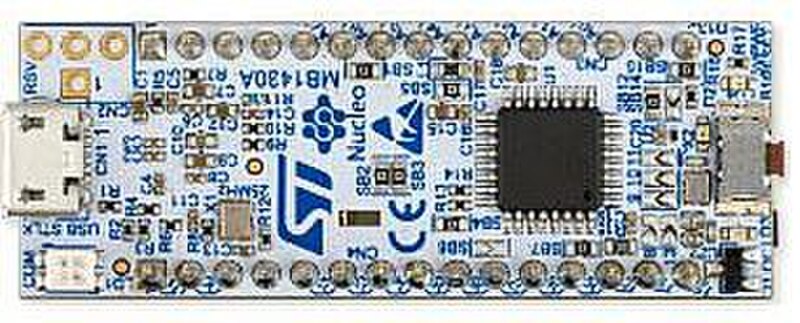
Source: Wikimedia Commons, Avandalen, CC BY-SA 4.0

Board power
The most common confusion: is the board powered by ST-Link or separately?
Options:
- Board is powered separately, ST-Link only connects to SWD and GND.
- ST-Link provides 3.3V to a small target board, if it is actually designed for this.
- ST-Link only reads
VTrefbut should not power the board.
You cannot blindly connect multiple power sources.
If the board is already powered by USB or a power supply, don't connect power from ST-Link until you are sure the schematic allows it.
How ST-Link differs from DFU
DFU is a flash mode through a USB bootloader, if available.
ST-Link works through SWD directly with the microcontroller.
ST-Link is useful when:
- DFU is not available;
- the bootloader is corrupted or not used;
- flashing disabled USB;
- the board won't enter normal flash mode;
- you need to erase memory;
- you need to recover STM32 access.
But if a board flashes normally through USB/DFU or SD card, ST-Link may not be needed.
Connect under reset
Sometimes firmware breaks SWD access.
For example:
- SWD pins are used as normal GPIO;
- firmware quickly sleeps the chip;
- code hangs right after startup;
- clock/power modes are set incorrectly.
In such cases, Connect under reset mode helps.
The idea: ST-Link holds reset and tries to connect before bad firmware executes.
This often requires connecting NRST.
How to know ST-Link sees the board
In STM32CubeProgrammer or similar tool you usually see:
- whether ST-Link is connected;
- whether the target is found;
- what chip is detected;
- whether you can read memory;
- whether you can erase flash.
If ST-Link is visible as a USB device but the target is not found, the problem is often the board connection:
- target board has no power;
- no common
GND; SWDIOandSWCLKare swapped;VTrefis not connected if needed;- SWD frequency too high;
- chip is locked;
- firmware prevents connection;
Connect under resetis needed.
SWD frequency
If communication is unstable, try reducing the SWD frequency.
On long wires, poor Dupont jumpers or unstable boards, high frequency can interfere with connection.
For board recovery, slow and reliable beats fast.
Common errors
- forgot
GND; - swapped
SWDIOandSWCLK; - connected power from ST-Link and USB at the same time without understanding the schematic;
- didn't power the target board;
- didn't connect
NRSTwhenConnect under resetis needed; - set SWD frequency too high;
- trying to flash ESP32 or RP2040 with ST-Link;
- trying to connect to a locked chip without understanding readout protection;
- using long poor quality wires;
- didn't update ST-Link firmware or didn't install driver.
What you cannot do
You cannot:
- apply 5V to a 3.3V STM32 board without checking;
- connect multiple power sources blindly;
- connect ST-Link to a board under mains voltage without safe isolation and enclosure;
- change SWD wires with power on if there is risk of shorting;
- assume a clone ST-Link has the same pinout as the original.
Clone ST-Link pinouts may differ. Always check the markings on your specific adapter.
The essentials
- ST-Link is needed for STM32 through SWD.
- Minimum:
SWDIO,SWCLK,GND, sometimesNRSTandVTref. - The board should be powered correctly, but not necessarily from ST-Link.
- DFU and ST-Link are different flashing methods.
Connect under resethelps recover access after bad firmware.- If the target is not found, first check power,
GND,SWDIO/SWCLK,NRSTand SWD frequency.
Reference materials
- STMicroelectronics: UM1075 ST-LINK/V2 User Manual - official ST-LINK/V2 manual, SWD/JTAG pins, target VCC and GND.
- STMicroelectronics: UM2237 STM32CubeProgrammer User Manual - ST-LINK connection modes, including Normal, Connect under reset and Hot plug.
- ST Wiki: ST-LINK - ST-LINK overview as hardware probe for STM32/STM8 and supported protocols.
- Klipper: Installation - general MCU preparation process for Klipper.
- STMicroelectronics: STM32CubeProgrammer - official ST tool for flashing STM32 through ST-LINK/SWD, UART, USB DFU, SPI, I2C and CAN bootloaders.