MCU em Klipper
Klipper consists of two main parts:
- host — a Linux computer with Klipper, such as a Raspberry Pi, Orange Pi, mini-PC, or other device;
- MCU — a microcontroller board that physically controls pins.
The host makes high-level decisions, reads configuration, processes G-code, and plans actions. The MCU executes precise commands on hardware: switches outputs, reads inputs, counts time, generates PWM, and reports status back to the host.
What is an MCU in Klipper
MCU stands for micro-controller unit.
In the context of Klipper, it is a specific board:
- main 3D printer board;
- separate RP2040 board;
- separate STM32 board;
- CAN/toolhead board;
- additional I/O board.
An MCU does not "think like the whole printer." It executes low-level commands sent by the host. This separation makes Klipper flexible: you can add a second or third MCU and use its pins in one shared configuration.
How it looks
Simplified scheme:
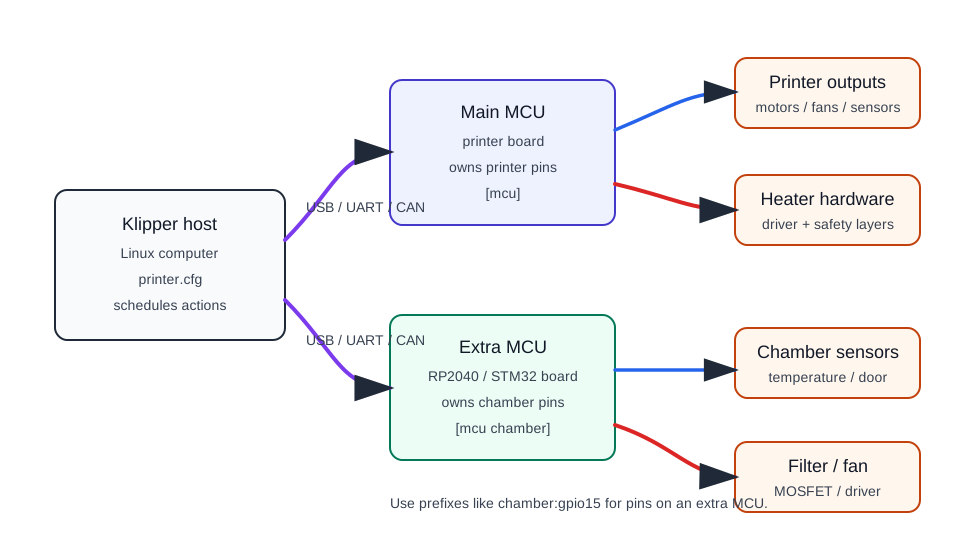
The host communicates with the MCU via USB, UART, or CAN. In the Klipper configuration, each MCU gets its own section, and the pins of that MCU are then used in fan, sensor, heater, output, and other module settings.
What the host does
The host:
- stores and reads
printer.cfg; - accepts G-code and user commands;
- maintains high-level logic;
- schedules actions over time;
- synchronizes communication with the MCU;
- decides when to switch a fan, heater, or other output;
- receives readings and status from the MCU.
The host does not apply current to a fan or read a thermistor directly if these pins are on an external board. It tells the MCU what to do.
What the MCU does
The MCU:
- physically controls GPIO;
- reads inputs and sensors;
- generates PWM;
- executes commands at the right time;
- reports results to the host;
- goes into shutdown on errors if firmware and configuration are set up that way.
For example, if the configuration has a fan on pin PA8, it is the MCU with that pin that changes its state. The host only sends the command.
What does [mcu] mean
In printer.cfg, the [mcu] section describes the microcontroller that Klipper should connect to.
Example for USB/serial:
For an additional MCU, you use a name:
After this, pins of the additional MCU can be specified with a prefix:
[temperature_sensor chamber_air]
sensor_type: Generic 3950
sensor_pin: chamber:gpio26

[fan_generic chamber_fan]
pin: chamber:gpio15
The logic is simple: chamber:gpio15 means "pin gpio15 on the MCU named chamber".
Pin names and prefixes
Klipper uses hardware pin names.
Examples:
- for STM32:
PA4,PB0,PC13; - for RP2040:
gpio15,gpio26; - for Arduino/AVR there may be their own aliases.
Before a pin name there can be symbols:
!— invert the logic;^— enable pull-up if the MCU supports it;~— enable pull-down if the MCU supports it.
Example:
This is not "Klipper magic," but a specific setting of an input pin on a specific MCU. So the board pinout must be accurate.
Why additional MCU is needed
Additional MCU is useful when you need to separate peripherals into a separate block.
Examples for iDryer-like devices:
- chamber temperature and humidity sensors;
- circulation fan;
- filter fan;
- backlighting;
- door button;
- lid sensor;
- damper servo;
- separate module with load cell;
- additional OLED or RFID;
- emergency input that is more convenient to route near the device.
This approach is convenient if the device should be part of a Klipper system, not a separate Wi-Fi box.
MCU approach or standalone controller
There are two different paths.
MCU in Klipper:
- the device is controlled from
printer.cfg; - pins are visible to Klipper;
- you can use existing sections like
fan_generic,temperature_sensor,heater_generic,output_pin; - the state is visible in the Klipper interface;
- communication with the host is required.
Standalone controller:
- the device makes its own decisions;
- may have Wi-Fi, web interface, MQTT;
- does not need to depend on the printer;
- requires its own firmware and safety logic;
- does not connect as a regular
[mcu]in Klipper.
ESP32 is often good for a standalone Wi-Fi device. RP2040 and STM32 are often more convenient as a wired MCU in Klipper.
USB, UART, and CAN
Communication between host and MCU can be different.
USB — the most common and simple option for one or two boards near the host. Convenient for Pico, STM32 boards, and many printer boards.
UART — serial communication via separate TX/RX pins. Can be useful on some boards, but requires careful level, ground, and speed connection.
CAN — convenient for remote modules, toolhead boards, and more stable wired architecture. But CAN requires a supported microcontroller, a CAN transceiver, a proper bus, terminators, and Linux interface setup.
For a first additional controller, USB is usually simpler. CAN makes sense when there is a real reason: longer wiring, multiple nodes, toolhead board, or existing CAN infrastructure.
MCU does not protect the power section
Important: adding an MCU does not make a load safe.
If an MCU controls a fan, heater, or SSR, you still need:
- correct power switch;
- proper power supply;
- wires and terminals for the current;
- fuse;
- independent thermal protection for the heater;
- safe enclosure;
- verification of behavior if communication is lost or the host is turned off.
If the host loses communication with the MCU, Klipper can shut down the system, but this does not replace hardware protection. A heater should be designed so that a single failure of firmware, sensor, SSR, or communication does not lead to an unsafe mode.
What to check before choosing an MCU
Before buying a board for Klipper MCU, check:
- whether the microcontroller is supported by Klipper;
- whether there is a ready configuration or instructions for the board;
- which communication method is needed: USB, UART, or CAN;
- how the board is flashed;
- whether you have enough GPIO, ADC, PWM, I2C, SPI, UART;
- which pins are really exposed;
- what GPIO logic: usually
3.3V; - whether drivers/MOSFET/SSR are needed for loads;
- whether there is documentation for power and pinout;
- what happens if communication with the MCU is lost.
For a first additional MCU, it is usually easier to choose RP2040/Pico or a well-known STM32 board with clear instructions.
Common mistakes
- thinking the MCU contains all of Klipper's logic;
- confusing host and MCU;
- adding
[mcu chamber]but then specifying pins without thechamber:prefix; - taking a pin from someone else's pinout;
- flashing the wrong microcontroller type in
make menuconfig; - not checking bootloader offset and board flashing method;
- using an unstable USB cable;
- connecting
5Vto3.3Vinput; - powering a load from GPIO;
- thinking software shutdown replaces a fuse and thermal fuse.
Key points
In Klipper, an MCU is a board that physically controls pins, and the host plans and coordinates the work. Additional MCU allows you to expand the system and move peripherals closer to the device.
For iDryer-like tasks, this is convenient for fans, sensors, filters, backlighting, buttons, and some actuators. But the power section and heater safety remain a separate hardware task.
Related materials
- Klipper: Code overview — Klipper architecture, division of host code and micro-controller code, timing model, and GPIO.
- Klipper: Configuration reference - Micro-controller configuration —
[mcu], additional[mcu name], pin name format, and prefixes. - Klipper: Installation - Building and flashing the micro-controller — general process of
make menuconfig, building, and flashing the MCU. - Klipper: Bootloaders — why different boards have different flashing methods and why bootloader matters.
- Klipper: CANBUS — CAN communication,
canbus_uuid, USB-to-CAN bridge, and hardware requirements.