Rozhraní I2C
I2C is a communication interface for small microchips and modules near the controller. Expansion: Inter-Integrated Circuit. In documentation you often see I2C bus.
Main idea: multiple devices can be connected to the same two signal lines SDA and SCL if they have different addresses.
Where I2C is used
In simple devices around a 3D printer, I2C is often used for:
- OLED displays;
- temperature, humidity, pressure, and light sensors;
- real-time clocks;
- GPIO expanders;
- some encoders and button modules;
- I2C multiplexers;
- some RFID/NFC modules;
- small auxiliary boards.
I2C works well for short connections within one enclosure. For long wires across the entire printer or near power lines, it becomes more risky.
SDA, SCL, power, and GND
An I2C module typically has 4 contacts:
VCCorVIN- power;GND- common ground;SDA- data;SCL- clock signal.
A circuit with multiple devices looks like this:
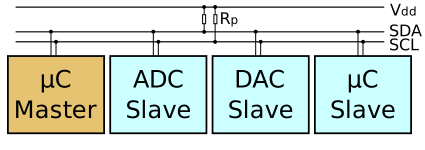
Source: Wikimedia Commons, Cburnett, CC BY-SA 3.0

All devices on the same I2C bus connect to the same SDA, SCL, and GND. Power can be common, but its voltage and logic levels must be verified for each module.
Device addresses
Each I2C device has an address. For example, small OLEDs often use 0x3C, some sensors use 0x76, 0x77, 0x68, 0x69, and so on.
If two devices on the same bus have the same address, the controller cannot properly address them individually.
What to do with address conflicts:
- change the address via jumper or solder bridge, if the module supports it;
- select a different module variant;
- use an I2C multiplexer;
- split devices across different I2C buses, if the controller and firmware allow it.
Address is often given in hexadecimal format (hex): 0x3C. But some firmware or configs may require decimal format (decimal). For example, 0x3C in decimal is 60. You need to check the documentation of the specific system.
Pull-up resistors
I2C lines work through pull-up resistors. Devices on the bus can typically pull SDA or SCL low, and the high level comes from pull-up to the logic supply.
Without pull-ups, the bus may not work. But too many modules with their own pull-ups on one bus can also be a problem: the total resistance becomes too small, the lines are loaded harder, signal edges and levels may degrade.
Practically:
- many OLEDs and sensor boards already have pull-up resistors;
- on a short simple bus this usually works immediately;
- if there are many devices, you need to check the module schematics and total pull-ups;
- if the bus is unstable, one of the first checks is pull-up resistors.
A common starting resistance for a separate bus is around 4.7 kOhm, but pull-ups in ready-made modules may be different.
3.3V and 5V
I2C is especially sensitive to voltage levels, because SDA and SCL are usually pulled to some supply voltage.
ESP32, RP2040, and STM32 typically operate with 3.3V logic. Arduino Uno/Nano often operates with 5V logic.
Dangerous situation:
3.3Vcontroller;- I2C module powered from
5V; - pull-up resistors on the module pull
SDAandSCLto5V.
In this case, 5V may appear on the controller's GPIO. This can damage the microcontroller.
Before connecting, verify:
- what voltage the module is powered from;
- what
SDAandSCLare pulled to; - if there is a level converter on the module;
- if the module is compatible with a
3.3Vcontroller.
If in doubt, use 3.3V power for I2C modules or a level converter.
Speed
Typical I2C speeds:
For short wires and normal modules, 400 kHz often works. But for long wires, weak pull-ups, many devices, or noisy environment, it's better to start with 100 kHz.
In Klipper, the i2c_speed parameter is not equally supported across all MCUs. The documentation states that many microcontrollers use 100000, while some platforms support 400000. So you cannot just write a high speed and assume it is actually applied.
I2C scanner
An I2C scanner is a small program or command that iterates through addresses and shows which devices respond on the bus.
It helps understand:
- does the controller see the module;
- what is the device address;
- are
SDAandSCLmixed up; - is there power and common
GND; - is there an address conflict.
But the scanner does not prove the device fully works. It only shows that someone responds at that address.
I2C in Klipper
In Klipper, an I2C device is connected to a specific MCU.
Configuration may include parameters:
i2c_mcu- which MCU the device is connected to;i2c_bus- hardware I2C bus, if there are multiple;i2c_software_scl_pinandi2c_software_sda_pin- software I2C on selected pins;i2c_address- device address;i2c_speed- speed, if supported.
Important: i2c_address in Klipper is often specified as a decimal number, not hex format. If the datasheet says 0x3C, the config may require 60.
If the device is connected to an additional MCU, that must also be specified. Otherwise Klipper will look for it on the main board.
Wire length and interference
I2C is designed for short connections. Inside a small enclosure or on one board, it is convenient. In a 3D printer, conditions are worse:
- motors nearby;
- heaters nearby;
- long wires;
- connectors on doors;
- power lines of fans and heaters;
- electromagnetic interference.
Practical rules:
- keep
SDAandSCLshort; - route them near
GND; - do not route parallel to heater power wires;
- do not make long ribbon cables to moving parts without reason;
- reduce speed to
100 kHzif there are errors; - use proper connectors and strain relief;
- for long connections, choose another interface: UART, CAN, RS-485, or local MCU near the sensor.
What to check before connecting
Before connecting an I2C module, verify:
- module power;
- logic level;
- what
SDAandSCLare pulled to; - device address;
- if the address can be changed;
- if there is a conflict with other devices;
- wire length;
- if there is firmware support;
- which MCU and bus the device connects to;
- if hardware I2C or software I2C is needed.
Typical mistakes
- mixed up
SDAandSCL; - forgot common
GND; - applied
5Vpull-ups to a3.3Vcontroller; - two devices have the same address;
- specified hex address where decimal was needed;
- used too long wires;
- connected many modules with pull-up resistors;
- chose a module not supported by firmware;
- connected device to an additional MCU but did not specify
i2c_mcu; - confuse I2C and I2S.
Key takeaway
I2C is convenient for small displays, sensors, and auxiliary modules near the controller. It requires SDA, SCL, power, and common GND.
Main checks before connecting: address, 3.3V/5V levels, pull-up resistors, wire length, and firmware support. In the noisy printer environment, keep I2C short.
Related materials
- SparkFun: I2C at the Hardware Level - practical explanation of
SDA,SCL, open-drain lines, and pull-up resistors. - SparkFun: I2C tutorial - general I2C guide, addresses, multiple devices on a bus, and hardware features.
- Adafruit: STEMMA QT technical specs - example of a standardized I2C connector, pinout, power, and
GND. - Adafruit: PCA9548 I2C multiplexer - example of resolving duplicate I2C address conflicts via multiplexer.
- Klipper Configuration Reference: common I2C settings -
i2c_address,i2c_mcu,i2c_bus, software I2C, andi2c_speedparameters.