Adaptéry USB-UART
A USB-UART adapter is needed so a computer or Linux host can communicate with a UART device via USB. It converts USB to regular serial lines TX, RX, and GND.
Such an adapter is often needed for flashing, logs, diagnostics, and recovering boards without a proper USB connector.
Where it is needed
USB-UART adapter is useful for:
- flashing some microcontroller boards;
- reading serial logs;
- accessing device console;
- bootloader mode diagnostics;
- connecting Arduino Pro Mini and some Nano clones;
- working with boards without built-in USB;
- recovery after failed flashing;
- temporary MCU connection to host via serial.
If a board already has proper USB and appears as a serial device, a separate USB-UART adapter may not be needed.
What it has
Typical contacts:
TXorTXO- transmission from adapter to device;RXorRXI- reception from device;GND- common ground;VCC,3V3, or5V- power, if needed;DTR- often used for auto-reset/flashing;RTS,CTS- flow control lines or boot/reset scenarios.
Connection diagram:
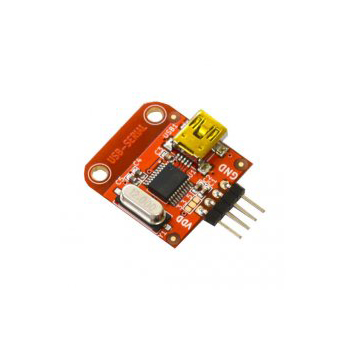
Source: Wikimedia Commons, SparkFun Electronics, CC BY 2.0

For simple log reading, TX, RX, and GND are often sufficient. Power is only connected if it is clear the board should be powered from the adapter.
How to connect TX and RX
Connection is cross-connected:
If there is no connection, the first check is: are TX and RX mixed up, is there a common GND, does the speed match, and is the correct COM/tty port selected.
3.3V and 5V
USB-UART adapters come in:
3.3Vonly;5Vonly;- with
3.3V/5Vswitch; - with jumper or solder jumper;
- with
VCCof one voltage, but signals of another level.
This matters: the level of VCC and the level of TX/RX are not always obvious from labels.
ESP32, RP2040, and STM32 typically use 3.3V logic. Arduino Uno/Nano often uses 5V logic. If you apply 5V signal to a 3.3V input, you can damage the board.
Before connecting, check the adapter and board documentation. Do not rely only on jumper color or label on the case.
TTL UART and RS-232
USB-UART adapter for microcontrollers usually outputs TTL/CMOS UART: 3.3V or 5V.
This is not the same as real RS-232.
RS-232 has different voltage levels and cannot be connected directly to a microcontroller GPIO. If you need to work with a real RS-232 port, you need a USB-RS232 adapter or level converter, not a regular USB-UART TTL.
Power from adapter
The VCC pin on the adapter can be useful, but is often misused.
Safe approach:
- for logs and diagnostics, first connect only
TX,RX,GND; - do not connect
VCCif the board is already powered from USB, power supply, or other circuit; - do not power motors, servos, relays, heaters, and LED strips via USB-UART;
- verify how much current the adapter can actually provide;
- understand that
VCCcan be3.3Vor5V.
If you connect two power sources without understanding the circuit, you can get reverse powering, instability, or board damage.
DTR and RTS
Some boards use DTR and RTS for auto-reset or bootloader entry.
Examples:
- Arduino Pro Mini often uses
DTRthrough a capacitor for reset during flashing; - ESP32 boards may use
DTR/RTSto auto-controlENandBOOT; - some bootloader scenarios require pressing a button manually if these lines are not connected.
If flashing does not start automatically, it is not always a TX/RX problem. It may be that DTR/RTS are not connected, wrong bootloader is selected, or BOOT/RESET must be pressed manually.
CH340, CP2102, FTDI
Popular USB-UART chips:
- CH340/CH341 - cheap and widespread adapters;
- CP2102/CP210x - common Silicon Labs USB-UART;
- FT232/FTDI - classic option, often more expensive;
- PL2303 - found in old adapters and cables.
On modern systems, the driver is often installed automatically, but not always. If the port does not appear, check:
- USB cable is not charge-only;
- device is detected by the system;
- if a driver is needed;
- if old driver is not conflicting;
- if the port is not occupied by another program.
How to test the adapter
Simple loopback test:
- Connect adapter to computer.
- Connect
TXof adapter toRXof adapter. - Open serial terminal.
- Select port and speed, for example
115200. - Type characters.
- If it works, characters are echoed back.
This tests the adapter itself, driver, cable, and terminal program without external board.
What to check before buying
Before buying a USB-UART adapter, verify:
- what
TX/RXlevels:3.3V,5V, or switchable; - how the level is selected;
- what chip is used: CH340, CP2102, FTDI, or other;
- if there are drivers for your system;
- if
DTRandRTSare present, if auto-flashing is needed; - what USB connector;
- if pins
GND,TX,RX,VCCare in convenient order; - if there is a schematic or good documentation;
- how much current can be drawn from
VCC, if needed.
For ESP32/RP2040/STM32 diagnostics, an adapter with 3.3V signals and clear marking is more convenient.
Typical mistakes
- connecting
TXwithTX,RXwithRX; - forgetting common
GND; - selecting
5Vlevel for3.3Vboard; - connecting
VCCto an already-powered board; - powering load via USB-UART adapter;
- confusing USB-UART TTL with USB-RS232;
- using a charge-only USB cable;
- not installing CH340/CP2102/FTDI driver;
- selecting wrong COM/tty port;
- not connecting
DTR/RTSwhen needed for auto-flashing; - leaving serial terminal open, then wondering why the flasher cannot open the port.
Key takeaway
USB-UART adapter is a bridge between computer USB and UART pins of a device. For minimal connection, you need cross-connected TX/RX and common GND.
Main risks: wrong 3.3V/5V level, unnecessary power connection, confusing TTL UART with RS-232, and missing DTR/RTS lines for flashing.
Related materials
- SparkFun: Serial Basic CH340C Hookup Guide - practical guide to USB-UART CH340C,
DTR/RX/TX/VCC/CTS/GNDpins, voltage selection, and loopback test. - SparkFun: Serial Basic Overview - pinout description and
3.3V/5Vswitching on adapter. - Adafruit: FT232H Serial UART - example USB-serial adapter,
TX/RX, flow-control lines, and connection to device. - Silicon Labs: CP2102 USB to UART Bridge - official example of USB-UART bridge chip and Virtual COM Port drivers.
- Klipper Configuration Reference:
[mcu]- how serial MCU connection is described in Klipper viaserial.