Current, Voltage and Load Power
Before connecting a heater, fan, LED strip, servo drive, or other module, you need to understand three things:
- voltage;
- current;
- power.
Without this, it is easy to buy the wrong power supply, overheat the wire, melt the connector, burn out a MOSFET module, or connect the load to the controller so that it works unstably.
Where to find the parameters
Voltage, current and power are usually found:
- on the component housing;
- on the power supply label;
- on the product page;
- in the technical specification;
- in the manual;
- in the board schematic or pinout.
If the parameter is not specified, it is not a minor issue. It is a reason to stop and figure out what exactly you are connecting.
For components from 3D printer periphery, typical parameters look like this:
- fan:
24V 0.2A; - heater:
24V 100W; - LED strip:
24V 9.6W/m; - servo drive:
5V, current depends on load; - controller board: maximum current for each output is specified separately.
Voltage must match
A load is designed for a specific voltage.
Examples:
- fan can be
5V,12Vor24V; - LED strip can be
5V,12Vor24V; - servo drive is often rated for
5Vor6V; - heater can be
12V,24Vor110-230V AC.
If you connect a 24V fan to 12V, it may not start or work weakly. If you connect a 12V fan to 24V, it can quickly fail.
The main rule:
power supply voltage must match load voltage.
Do not connect a device to a higher voltage just because the connector fits physically.
Power shows load size
Power shows how much energy the load consumes or converts into work, heat, light, or motion.
Power is measured in watts: W.
Examples:
24V 5W- small load;24V 24W- about1A;24V 120W- already about5A;24V 240W- about10A.
Heaters typically consume a lot of power. Fans consume less, but they can have high inrush current. LED strips can be a small load if short, or a serious load if long and bright.
Current loads wires and power elements
Current shows how much electricity flows through wires, terminals, connectors, and power elements.
Current often creates practical problems:
- wires heat up;
- terminals turn dark;
- connectors melt;
- MOSFET overheats;
- power supply is not enough;
- device reboots when load turns on;
- fuse trips not by chance, but due to real overload or error.
Therefore, it is not enough to know only voltage. You need to calculate current.
Calculation formula
For most simple calculations, you need the power formula:
Where:
P- power in wattsW;U- voltage in voltsV;I- current in amperesA.
To find current:
Source: Wikimedia Commons, GorillaWarfare, CC0 Public Domain

This formula is not for an exam. It is needed to understand whether the power supply, wire, terminal, MOSFET module, relay, SSR, or board output will withstand it.
Quick table for 24V
In 3D printers and peripherals, 24V is common. For quick assessment, it is useful to remember:
| Power | Current at 24V |
|---|---|
12W |
0.5A |
24W |
1A |
48W |
2A |
96W |
4A |
120W |
5A |
240W |
10A |
300W |
12.5A |
These are approximate values, but for the first choice of power supply, wire, and power switch they are very useful.
Example: 24V 100W heater
You have a heater:
Calculate the current:
This means the following must withstand more than 4.17A:
- power supply;
- wire;
- terminals;
- connector;
- MOSFET or SSR;
- fuse and fuse holder;
- board traces, if the heater is connected to the board.
If the power supply is rated for 24V 5A, it formally comes close to the load, but almost without headroom. For a real device it is better to take more.
Example: multiple loads
Suppose a 24V device has:
- heater
100W; - fan
24V 0.2A; - LED strip
24V 1A; - another fan
24V 0.15A.
Calculate the heater:
Sum them up:
A minimum power supply "tight fit" would be around 24V 6A, but that is a poor choice for long-term operation. With 50% headroom:
Practically you should look at a 24V 9A, 24V 10A or larger power supply, if the enclosure, cooling, and safety allow.
Headroom is mandatory
Power supply, wiring, terminals, and power modules cannot be selected exactly according to the calculated current.
For this guide, a simple rule for rough first assessment:
plan for at least 50% headroom, unless the documentation of a specific component requires more. This is not a universal guarantee, but a starting estimate. Final selection is made according to technical specifications, temperature inside the enclosure, cooling, derating, and actual heating of terminals/wires.
Headroom is needed because:
- power supply heats up;
- temperature inside the enclosure may be higher than room temperature;
- fans and motors have inrush current;
- contacts age and loosen;
- terminals have current and temperature limits;
- SSR and MOSFET generate heat;
- power supply may have derating - reduction of maximum power at high temperature or poor ventilation.
Industrial power supplies often have a derating curve in the technical specification — a curve of reduced maximum power as temperature rises. Derating means that at high temperature or poor ventilation, the manufacturer reduces the maximum allowable power. Therefore, the 240W label on a power supply does not always mean that it will safely deliver 240W in a closed hot enclosure.
Weak point may not be power supply
Even if the power supply is powerful, the circuit may be weak elsewhere.
You need to check the entire circuit:
- power supply output;
- wire;
- terminal block;
- connector;
- fuse;
- MOSFET module;
- relay or SSR;
- board traces;
- the load itself.
For example, a power supply can withstand 10A, but a small connector or poor screw terminal can heat up already at lower current. This is especially important for heaters and LED strips.
What is a power switch
A power switch is a controlled switch.
The controller does not power a heavy load directly. It gives a weak control signal, and the power switch turns the load current on or off.
Examples:
- MOSFET module for
12V/24VDC loads; - relay;
- SSR;
- ready-made load driver;
- standard power output of the board, if it is rated for the needed load.
For heaters, fans, LED strips, and motors, the rule almost always applies:
GPIO of the controller does not power the load. GPIO only controls.
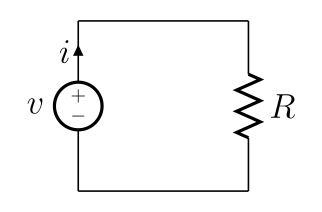
A bit about Ohm's law
Ohm's law relates voltage, current, and resistance:
For this article, the simple idea is important: if you apply voltage to a load, current will flow through it. How much current flows depends on the load itself.
But not all loads behave the same:
- heater is close to a resistive load;
- fan and motor have inrush current;
- servo drive sharply increases current when blocked;
- LED strip consumes current by length and brightness;
- electronic module may have transient current when turned on.
Therefore, for a real device it is better to take data from technical specifications or measure current with a multimeter / lab power supply if it is safe.
What to check before connecting
Before connecting the load, answer:
- What voltage is the load rated for?
- Is it a DC or AC load?
- What power or current is specified?
- What current will you get from the formula
I = P / U? - What other loads are on the same power supply?
- Is there at least
50%headroom? - Do wires, terminals, connectors and board withstand it?
- What will control the load: MOSFET, relay, SSR, or standard output?
- Is a fuse needed?
- What happens if there is a short circuit, motor jam, or fan failure?
If this is a heater or mains voltage 110-230V AC, safety requirements are higher. The mains section cannot be assembled by guessing: you need a suitable enclosure, fuse, insulation, protective grounding PE, strain relief for wires, and verification by a qualified person.
The main point
- Power supply voltage must match load voltage.
- Power shows the size of the load.
- Current shows the load on wires, terminals, connectors, and power elements.
- Basic formula:
I = P / U. - In a
24Vsystem24Wis about1A,120Wis about5A,240Wis about10A. - Currents of all loads on one power supply add up.
- You need headroom of at least
50%for rough first estimate; precise selection is made according to technical specifications, temperature, cooling, and derating. - The weak point may not be the power supply, but a terminal, connector, wire, MOSFET, or board trace.
- GPIO of the controller does not power a heavy load, only controls a power switch.
Reference materials
- SparkFun: Voltage, Current, Resistance, and Ohm's Law - clear basic explanation of voltage, current, resistance and Ohm's law.
- DigiKey: Ohm's Law Calculator - calculator for calculating voltage, current, resistance and power relationships.
- Mean Well: How to read a derating curve - why the maximum power of a power supply depends on temperature, ventilation and input voltage.
- DigiKey: Selecting and Applying AC/DC Power Supplies - selecting a power supply taking into account temperature, derating, cables and load type.
- Weidmuller: Derating curve / current-carrying capacity - why the maximum current of terminals and connectors depends on temperature and design.