Flashing the Controller
Firmware (firmware) is a program written to the flash memory of a microcontroller. Without firmware, the board does not know what to do with pins, sensors, fans, and interfaces.
Important: do not confuse firmware and configuration. Firmware is written to the controller. Klipper configuration usually lives on the host in printer.cfg and tells the already-flashed MCU which pins and parameters to use.
Firmware, bootloader, config
Three different concepts:
- firmware - main program of the microcontroller;
- bootloader - small program that helps write the main firmware;
- config - device settings, for example
printer.cfgin Klipper.
The bootloader runs first and can accept new firmware via USB, UART, DFU, SD card, CAN, or other mechanism. If the bootloader is accidentally erased, flashing the board may become difficult: sometimes ST-LINK/SWD, USB-UART, or other programmer is needed.
General route
Before flashing, the normal procedure is:
- Learn the exact board model.
- Learn the exact microcontroller.
- Find the pinout, schematic, and manufacturer instructions.
- Understand if standalone firmware or Klipper MCU firmware is needed.
- Find a ready config or example for this board.
- Choose the correct flashing method.
- Build or download the correct file.
- Put the board in flashing mode.
- Write the firmware.
- Verify the board appears in the system.
- Verify communication with host and basic pins without load.
You cannot guess firmware settings. For Klipper, the microcontroller type, bootloader offset, clock reference, and communication interface are especially important.
Typical flashing methods
Different boards flash differently:
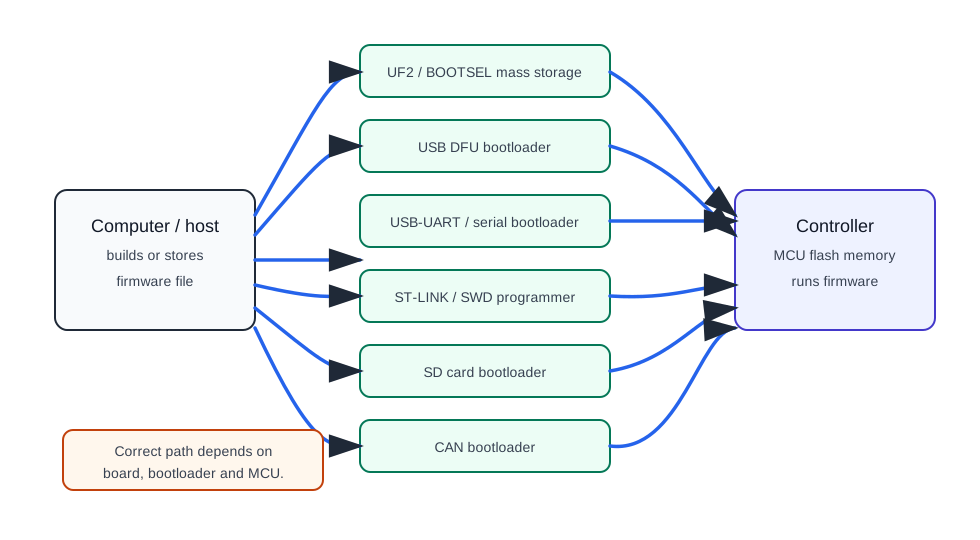
Common variants:
- USB mass storage / UF2 - board appears as a disk,
.uf2is copied to it; - USB DFU - board enters DFU mode, firmware is written via USB;
- USB serial / UART bootloader - firmware via serial port;
- ST-LINK / SWD - programmer connects to SWD pins;
- SD card - some 3D printer boards flash with a file on the card;
- CAN/Katapult/CanBoot - firmware via CAN bootloader;
- Arduino bootloader - sketch flashing via Arduino IDE or avrdude.
There is no one universal method for all boards. The method is determined by the specific board, bootloader, and firmware.
RP2040 and UF2
For Raspberry Pi Pico and many RP2040 boards, the simplest way is BOOTSEL and UF2.
Usually:
- Hold
BOOTSEL. - Connect USB.
- Board appears as
RPI-RP2disk. - Copy
.uf2file. - Disk disappears, board reboots.
Pico's BOOTSEL is in the microcontroller ROM, so it cannot be accidentally erased by normal flashing. This makes RP2040 convenient for beginners.
STM32: DFU, ST-LINK, SD card
STM32 boards flash in different ways.
Possible options:
- built-in USB DFU bootloader;
- UART bootloader;
- ST-LINK/SWD;
- SD card on printer board;
- board manufacturer bootloader;
- CAN bootloader.
For STM32, bootloader offset is often important. For example, if bootloader takes the first 8 KiB, Klipper must be built with the correct offset. If chosen wrong, the board may not start after flashing.
ST-LINK/SWD is useful as a more low-level option: it can often recover a board if the normal bootloader does not work. But this requires SWD pins, programmer, and understanding of connection.
Klipper: make menuconfig
For Klipper firmware, you usually do:
In make menuconfig, you select:
- micro-controller architecture;
- processor model;
- bootloader offset;
- clock reference;
- communication interface: USB, serial, CAN, etc.;
- sometimes additional parameters for specific board.
The correct values are often written in comments at the top of a ready config file for the board. If such a config exists, read its top comments first.
After build, the firmware file usually appears in ~/klipper/out/. Next, it is written using the method suitable for the specific board.
Verification after flashing
After flashing, you must verify more than just "flasher wrote success".
Check:
- does the device appear in the system;
- is
/dev/serial/by-id/...present, if using USB/serial; - is
canbus_uuidvisible, if using CAN; - does the path match
printer.cfg; - are there no communication errors in Klipper;
- do pins match the pinout of this specific board;
- do basic inputs/outputs work without power load;
- are fan/MOSFET/SSR off in safe state.
For the first check, do not connect the heater as the final load. First verify communication, sensors, and logic under safe conditions.
What to save before flashing
Before changing firmware, it is useful to save:
- current
printer.cfg; - old firmware version, if available;
- board model and microcontroller;
- found serial path or CAN UUID;
- photo of connections;
- pinout;
make menuconfigsettings;- link to manufacturer instructions.
If something goes wrong, this data will help recover quickly.
What can go wrong
Common problems:
- USB cable is charge-only;
- board did not enter bootloader;
- wrong microcontroller selected;
- wrong bootloader offset selected;
- wrong communication interface selected;
- firmware written, but board is looked for in wrong place;
- serial path changed after reconnection;
- SD card not read by board;
- firmware file named incorrectly for board bootloader;
- DFU/USB-UART driver not installed;
- board powered from two sides;
- after flashing, config references old pins.
Do not change everything in response to the first error. Better to go step by step: cable, bootloader mode, MCU model, build settings, write method, system device appearance, configuration.
Flashing and safety
Firmware can turn outputs on and off, but it does not replace hardware safety.
For heaters you need:
- correct power switch;
- fuse;
- independent thermal protection;
- correct temperature sensor;
- safe enclosure;
- check behavior on firmware error, MCU hang, or lost communication.
After flashing the controller, do not connect the heater without verifying that the pin is chosen correctly, the on logic is not inverted, and safety limits work.
Typical mistakes
- confuse firmware and
printer.cfg; - flash file from similar but different board;
- do not read comments at the top of ready Klipper config;
- select wrong bootloader offset;
- erase bootloader without understanding consequences;
- use charge-only USB cable;
- do not put board in flashing mode;
- look for CAN board in
/dev/serial/by-id; - look for USB-serial board via
canbus_uuid; - connect power load before verifying pins;
- do not save old configuration.
Key takeaway
Firmware is the program inside the controller, configuration is its operating settings. For each board, you must know the exact model, microcontroller, bootloader, flashing method, and build parameters.
For RP2040, UF2/BOOTSEL is usually simplest. For STM32, check the specific board: DFU, ST-LINK, SD card, UART, or CAN bootloader. For Klipper, first find a ready config and comments for make menuconfig.
Related materials
- Klipper: Installation - Building and flashing the micro-controller - official route for
make menuconfig,make, and serial path verification. - Klipper: Bootloaders - why bootloaders differ between boards, why bootloader offset is needed, and how different MCUs are flashed.
- Raspberry Pi Documentation: Pico-series microcontrollers - BOOTSEL, UF2, and Pico/RP2040/RP2350 specifics.
- Raspberry Pi Documentation: C/C++ SDK - Your First Binaries - official example of BOOTSEL, USB mass storage
RPI-RP2, and Pico flashing via UF2. - STMicroelectronics: STM32CubeProgrammer - official STM32 tool for flashing via ST-LINK/SWD, UART, USB DFU, SPI, I2C, and CAN bootloader.